
Find the Infor prices that fell behind your costs.
Hawkeye is pricing software for distributors with thousands of products. Every night its AI agents read Infor CSD or SX.e and find the customer prices worth raising. Each one comes with the reason written out.
You approve the ones you agree with, and Hawkeye writes them back to Infor.
Costs move every month. Contracts don’t.
Most Infor distributors run book pricing: cost-plus by product category and customer type. Contract prices sit on top, set at a margin and reviewed once a year on the date the account was set up. When a manufacturer raises prices, the buyers update the cost. The contracts wait for their review date, and the reps don’t always get to them.
Hawkeye checks every product for every customer, every night, and tells you which prices to change and why.
A contract waits for its anniversary
Contracts get reviewed on the date the account was set up. A manufacturer increase that lands in February doesn’t reach a contract that renews in November until November, if the rep gets to it then.
Hawkeye checks every contract against current cost every night, so the gap shows up the week the cost moves, not at renewal.
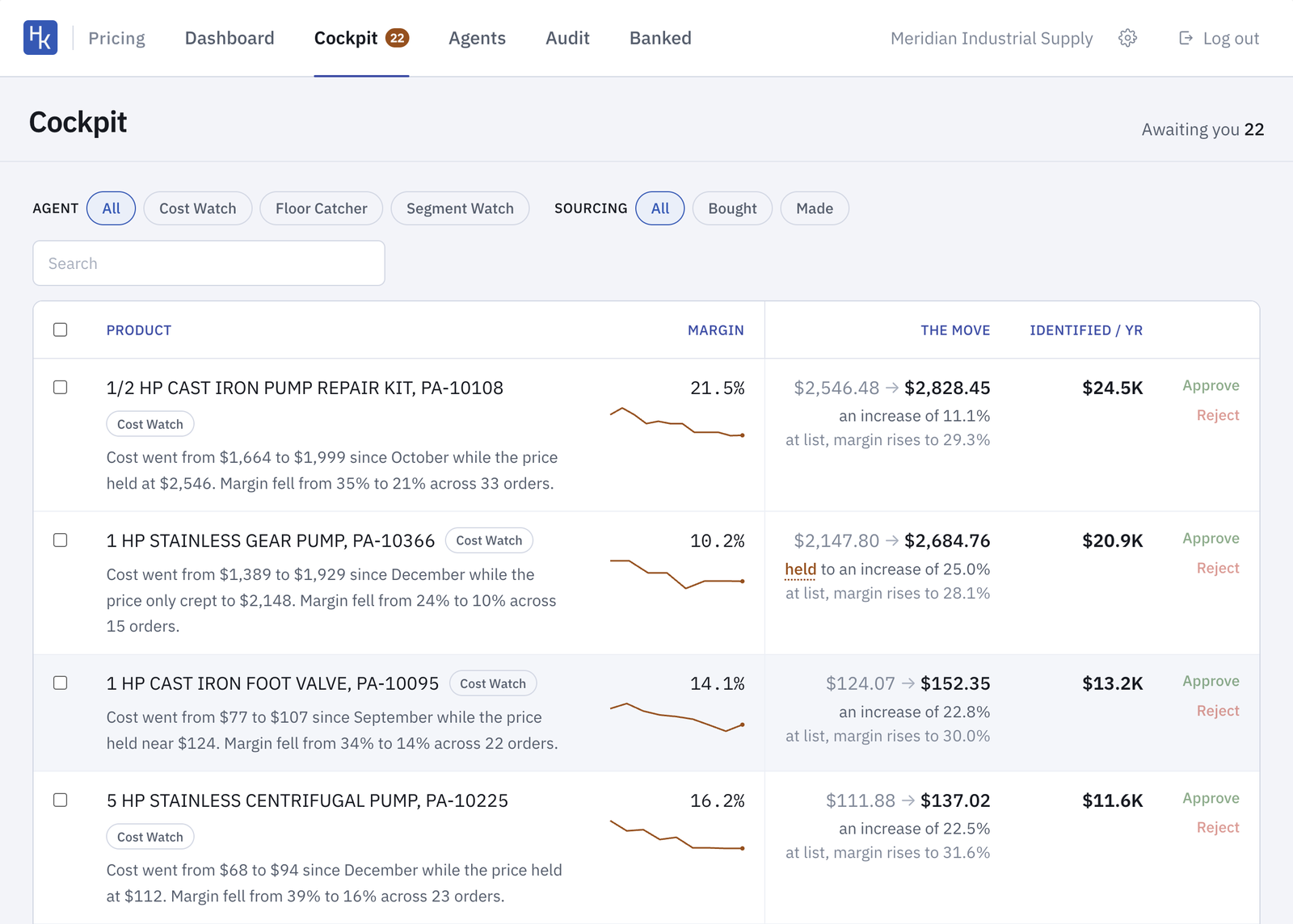
Every change comes with the reason.
Each change names the contract, the cost increase that landed under it and how far its margin has fallen since the last review. It shows the new price, the margin at that price, and what the change is worth in a year.
What we find in the invoices
- 1 in 4customer prices hadn’t moved in 12 months
- 4.6 ptsmedian margin lost where cost rose under a flat price
- $153Ka year in added margin, estimated, from one customer’s approved changes
“Hawkeye shows us the specific parts where costs have outrun our prices, and why. We approved 60 changes in one meeting, and they were in our ERP the next day.”
Brad Elsten, CFO, VC999
How it works with Infor
- Connect. Hawkeye connects to Infor read-only and pulls your book prices, contract prices, customer types, costs, invoices and orders. Nothing gets written until you sign off on the guardrails.
- Find. Every night the agents look for a cost that moved under a price that didn’t, a contract still priced off last year’s cost, and customers paying different prices for the same product.
- Approve. You approve the changes you agree with. Hawkeye writes them to Infor that night and tracks every sale at the new price.
Questions about Hawkeye and Infor
Does Hawkeye work with Infor CloudSuite Distribution and SX.e?
Yes. Hawkeye reads your data from Infor CSD or SX.e and writes approved prices back to it.
What does Hawkeye read from Infor?
Your book prices, contract prices, customer types, costs, invoices and orders. It builds a baseline for every product and every customer before it suggests a single change.
We're still on an older version of SX.e. Does that matter?
No. The first run works from a file export, so the version doesn't matter. Many SX.e distributors have been on the same release for years.
We price cost-plus by customer type. Does Hawkeye change that?
No. Hawkeye works inside the structure you have. It flags the prices that fell out of line and leaves your rules alone.
See which of your Infor prices are wrong.
Send us a year of Infor invoices. We run Hawkeye on them and walk you through the top price changes before you buy anything.
Get a demo